
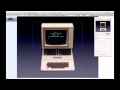
Keynote Animation Features Quiz

Interactive Video
•
Computers
•
9th - 10th Grade
•
Practice Problem
•
Hard

Nancy Jackson
FREE Resource
10 questions
Show all answers
1.
MULTIPLE CHOICE QUESTION
30 sec • 1 pt
What is the main feature discussed in the video that allows for animating images in Keynote?
Slide Transitions
Action Builds
Text Animations
Color Filters
2.
MULTIPLE CHOICE QUESTION
30 sec • 1 pt
What is the first step in preparing images for animation in Keynote?
Adding text to images
Resizing images
Changing image colors
Grouping images
3.
MULTIPLE CHOICE QUESTION
30 sec • 1 pt
Which tab in the inspector is used to access the action builds feature?
Builds
Document
Arrange
Format
4.
MULTIPLE CHOICE QUESTION
30 sec • 1 pt
What does the 'Dissolve' effect do to the images in Keynote?
Rotates them
Scales them up
Groups them into one box
Changes their color
5.
MULTIPLE CHOICE QUESTION
30 sec • 1 pt
How can you change the order of images in an animation sequence?
By resizing them
By changing their color
By renaming the files
By dragging and dropping them
6.
MULTIPLE CHOICE QUESTION
30 sec • 1 pt
Which effect is described as similar to a revolving door?
Shuffle
Spin
Revolve
Push
7.
MULTIPLE CHOICE QUESTION
30 sec • 1 pt
What is the 'Grid' effect used for in Keynote animations?
To change image colors
To add text to images
To arrange images in rows and columns
To create a 3D effect
Access all questions and much more by creating a free account
Create resources
Host any resource
Get auto-graded reports

Continue with Google

Continue with Email

Continue with Classlink

Continue with Clever
or continue with

Microsoft
%20(1).png)
Apple

Others
Already have an account?


