
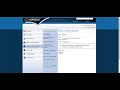
Navigating the Acadian Learning Platform

Interactive Video
•
Mathematics
•
6th - 7th Grade
•
Hard

Thomas White
FREE Resource
Read more
15 questions
Show all answers
1.
MULTIPLE CHOICE QUESTION
30 sec • 1 pt
What is the first step to access Acadian Math reports?
Contact the assessment department.
Select the Acadian Reading module.
Navigate to Acadian learning.net.
Enter your email address.
2.
MULTIPLE CHOICE QUESTION
30 sec • 1 pt
Where can you find your login information for Acadian Learning?
In a text message.
In a mailed letter.
In an email.
On the website homepage.
3.
MULTIPLE CHOICE QUESTION
30 sec • 1 pt
What should you check after logging in to ensure you are in the correct module?
The top right corner for Acadian Math.
The top left corner for the Acadian logo.
The bottom of the page for a help link.
The center of the page for a welcome message.
4.
MULTIPLE CHOICE QUESTION
30 sec • 1 pt
What should you do if you cannot see the reports you are looking for?
Double-check you are in Acadian Math.
Contact technical support immediately.
Log out and log back in.
Refresh the page.
5.
MULTIPLE CHOICE QUESTION
30 sec • 1 pt
What is the default module shown when you log in to Acadian Learning?
Acadian Math.
Acadian Science.
Acadian History.
Acadian Reading.
6.
MULTIPLE CHOICE QUESTION
30 sec • 1 pt
What should you do if the reports are not visible?
Contact the IT department.
Clear your browser cache.
Restart your computer.
Check if you are in Acadian Math.
7.
MULTIPLE CHOICE QUESTION
30 sec • 1 pt
What is the purpose of the drop-down menu in the Acadian Learning platform?
To log out of the account.
To adjust the screen brightness.
To select the correct module.
To change the language.
Access all questions and much more by creating a free account
Create resources
Host any resource
Get auto-graded reports

Continue with Google

Continue with Email

Continue with Classlink

Continue with Clever
or continue with

Microsoft
%20(1).png)
Apple

Others
Already have an account?

