
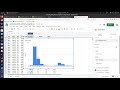
Creating and Analyzing Histograms in Google Sheets

Interactive Video
•
Mathematics, Computers, Instructional Technology
•
9th - 10th Grade
•
Practice Problem
•
Hard

Patricia Brown
FREE Resource
Read more
10 questions
Show all answers
1.
MULTIPLE CHOICE QUESTION
30 sec • 1 pt
What is the initial step in creating a histogram from a column of data in Google Sheets?
Create a pivot table
Select the data and click on 'Insert Chart'
Type the data manually into a new sheet
Use the 'Data Analysis' tool
2.
MULTIPLE CHOICE QUESTION
30 sec • 1 pt
Why might Google Sheets initially display a bar chart instead of a histogram?
Histograms are not supported in Google Sheets
Google Sheets often defaults to bar charts for categorical data
Bar charts are the default for quantitative data
Bar charts are more visually appealing
3.
MULTIPLE CHOICE QUESTION
30 sec • 1 pt
How can you change the chart type to a histogram in Google Sheets?
By right-clicking on the chart and selecting 'Change Type'
By selecting 'Histogram' from the chart editor
By clicking 'Format' and choosing 'Histogram'
By using the 'Data' menu
4.
MULTIPLE CHOICE QUESTION
30 sec • 1 pt
What does adjusting the bin width in a histogram help you achieve?
A faster loading time
A more colorful chart
A larger chart size
A more detailed view of the data distribution
5.
MULTIPLE CHOICE QUESTION
30 sec • 1 pt
What is the effect of setting a smaller bin size in a histogram?
It changes the data values
It reduces the number of data points
It increases the resolution of the data distribution
It makes the chart less accurate
6.
MULTIPLE CHOICE QUESTION
30 sec • 1 pt
What is the purpose of the 'Show Item Dividers' feature in a histogram?
To adjust the bin width
To change the chart type
To add color to the chart
To separate each individual data point
7.
MULTIPLE CHOICE QUESTION
30 sec • 1 pt
Why might it be unnecessary to use item dividers in a histogram?
They make the chart too colorful
They reduce the chart's accuracy
They can clutter the chart and the y-axis already provides counts
They are not supported in Google Sheets
Access all questions and much more by creating a free account
Create resources
Host any resource
Get auto-graded reports

Continue with Google

Continue with Email

Continue with Classlink

Continue with Clever
or continue with

Microsoft
%20(1).png)
Apple

Others
Already have an account?

