
Fusion 360 Commands
Authored by Ronald Puccetti
Design, Computers
9th Grade - Professional Development
Used 282+ times


AI Actions
Add similar questions
Adjust reading levels
Convert to real-world scenario
Translate activity
More...
Content View
Student View
16 questions
Show all answers
1.
MULTIPLE CHOICE QUESTION
30 sec • 1 pt
is used to create the base 2D profiles for creating solid models, surfaces, and T-spline forms. It's the 2D geometry that supports the creation of the 3D part.
Sketch
Revolve
Line
Loft
2.
MULTIPLE CHOICE QUESTION
30 sec • 1 pt
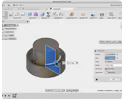
creates T-Spline, solid, or surface revolved features by sweeping sketch and model geometry around an axis.
Sketch
Revolve
Line
Loft
3.
MULTIPLE CHOICE QUESTION
30 sec • 1 pt
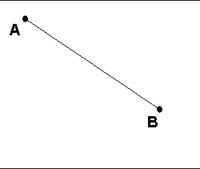
a cad object defined by two endpoints
Sketch
Revolve
Line
Loft
4.
MULTIPLE CHOICE QUESTION
30 sec • 1 pt

Creates a 3D solid or surface by specifying a series of cross sections. The cross sections define the shape of the resulting solid or surface. You must specify at least two cross sections.
Sketch
Revolve
Line
Loft
5.
MULTIPLE CHOICE QUESTION
30 sec • 1 pt
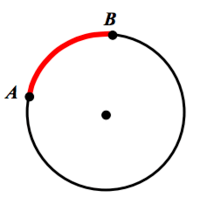
part of a circle you can connect by two points. You can specify combinations of center, endpoint, start point, radius, angle, chord length, and direction values.
Arc
Construction Line
Mirror
Fillet
6.
MULTIPLE CHOICE QUESTION
30 sec • 1 pt

is a temporary line which used for reference while creating and positioning the other line entity to make it fully constrained.
Arc
Construction Line
Mirror
Fillet
7.
MULTIPLE CHOICE QUESTION
30 sec • 1 pt

creates a reversed/reflected image of the selected object in a specified direction and distance.
Arc
Construction Line
Mirror
Fillet


Access all questions and much more by creating a free account
Create resources
Host any resource
Get auto-graded reports

Continue with Google

Continue with Email

Continue with Classlink

Continue with Clever
or continue with

Microsoft
%20(1).png)
Apple

Others
Already have an account?


