
Photoshop Intro1
Authored by Karen Forbes
Design
7th - 12th Grade
Used 63+ times


AI Actions
Add similar questions
Adjust reading levels
Convert to real-world scenario
Translate activity
More...
Content View
Student View
30 questions
Show all answers
1.
MULTIPLE CHOICE QUESTION
45 sec • 1 pt
How do you reset the Essentials Workspace?
File > Workspace > Reset Essentials
Window > Workspace > Reset Essentials
Edit > Workspace > Reset Essentials
Edit > Essentials> Reset Essentials
2.
MULTIPLE CHOICE QUESTION
20 sec • 1 pt
Icon that temporarily shows or hides a layer?
Trash Can
Paper
Mask
Eyeball
3.
MULTIPLE CHOICE QUESTION
20 sec • 1 pt
When editing an image, it is important to use multiple _____ to separate parts of your image
4.
MULTIPLE CHOICE QUESTION
20 sec • 1 pt
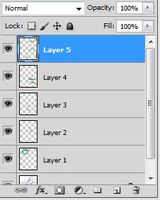
This is called the__________ Panel.
Color
Drawings
Layers
Pictures
5.
MULTIPLE CHOICE QUESTION
30 sec • 1 pt
What panel allows you to go back to a previous state of an image, kind of like Edit Undo?
History
Adjustments
Layers
Navigator
6.
MULTIPLE CHOICE QUESTION
20 sec • 1 pt
In Photoshop the keyboard shortcut to zoom into your image is
Ctrl + Z
Ctrl +
Z
Press the spacebar
7.
MULTIPLE CHOICE QUESTION
30 sec • 1 pt
When 2 or more parts in a design are different....to create visual interest. Ex. Use of color, Size, Boldness, etc
Proximity
Contrast
Rule of Thirds
Gestalt Theory
Access all questions and much more by creating a free account
Create resources
Host any resource
Get auto-graded reports

Continue with Google

Continue with Email

Continue with Classlink

Continue with Clever
or continue with

Microsoft
%20(1).png)
Apple

Others
Already have an account?


