

How to use Quizizz Lessons

Presentation
•
Professional Development
•
KG - 12th Grade
•
Practice Problem
•
Easy

Christina Lucas
Used 44+ times
FREE Resource
11 Slides • 6 Questions
1
How to use Quizizz Lessons
2
Open Ended
3
Quizziz Lessons offers the same options as Quizziz in a lesson format

4
Poll
5
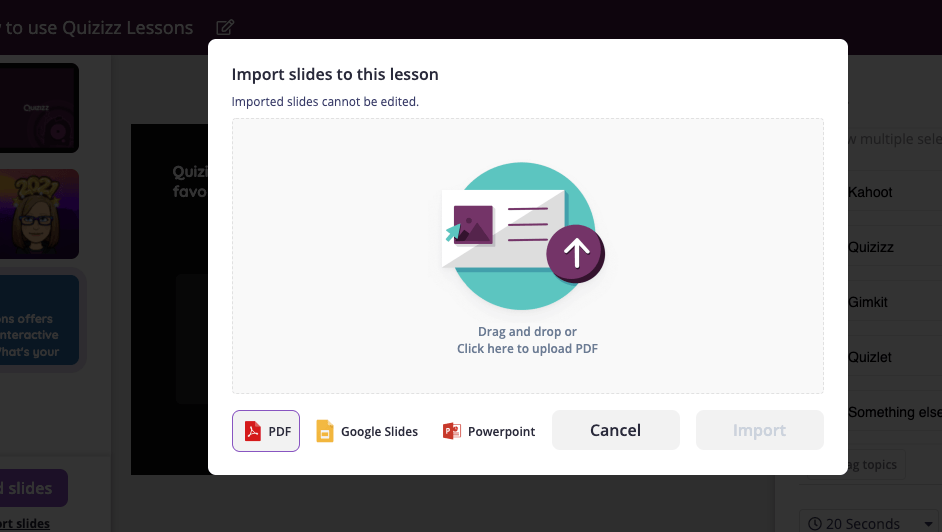
Add Slides from Google Slides, Powerpoint, or Create your own
Use the Quizzizz Import
6
Keep your student engaged with
Multiple choice questions
polls
Open ended questions
Checkboxes
Fill in the blank

7
Multiple Select
8
Fill in the Blank

Fill in the Blank option
The name of our school is Guilford eLearning University_____
9
Poll

Poll option:
What's been your "go to" for your family meals during the pandemic?
10
Open Ended

What's your favorite streaming service ( if you use any) ?
11
12
13
14
Use pre-made questions
Use the Teleport to find questions from other published Quizziz sets.

15
Use the Lesson for Synchronous or Asynchronous Learning
When you select the Lesson, this option will be available.

16
REPORTS
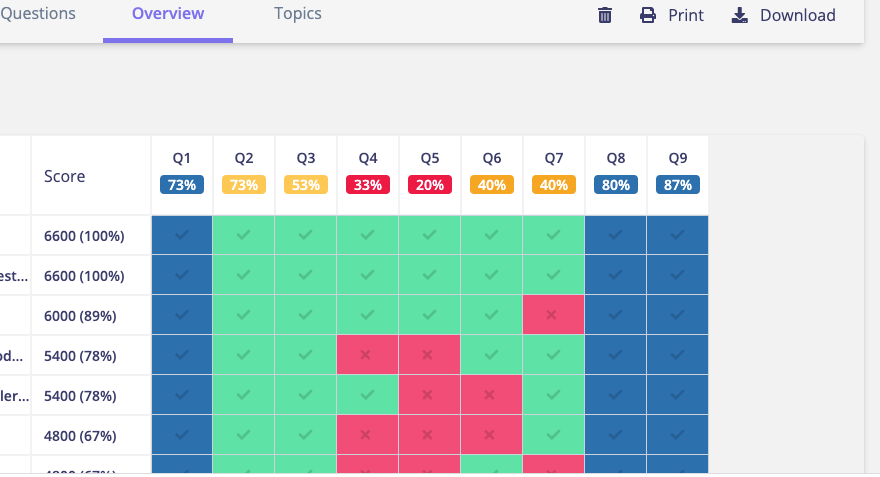
Reports can give details on attendance and participation

17
REPORTS
Get details on every question and poll.
How to use Quizizz Lessons
Show answer
Auto Play
Slide 1 / 17
SLIDE
Similar Resources on Wayground

10 questions
3rd Grade Fractions
Lesson
•
3rd Grade
10 questions
Pronouns and Antecedents
Lesson
•
5th Grade
11 questions
Technical Training
Lesson
•
Professional Development
12 questions
Algebraic Vocabulary
Lesson
•
7th - 9th Grade
12 questions
Simple, Compound, and Complex Sentences
Lesson
•
7th Grade
12 questions
Setting
Lesson
•
6th Grade
13 questions
The Verb IR
Lesson
•
6th - 8th Grade
12 questions
Quizizz 101
Lesson
•
Professional Development
Popular Resources on Wayground
15 questions
Fractions on a Number Line

Quiz
•
3rd Grade
20 questions
Equivalent Fractions
Quiz
•
3rd Grade
25 questions
Multiplication Facts
Quiz
•
5th Grade
29 questions
Alg. 1 Section 5.1 Coordinate Plane
Quiz
•
9th Grade
22 questions
fractions
Quiz
•
3rd Grade
11 questions
FOREST Effective communication
Lesson
•
KG
20 questions
Main Idea and Details
Quiz
•
5th Grade
20 questions
Context Clues
Quiz
•
6th Grade
Discover more resources for Professional Development
50 questions
Workplace Readiness Skills Quiz _ 50 Questions
Quiz
•
9th - 12th Grade
13 questions
NRF Customer Service & Sales: "Build a Continuing Relationship"
Quiz
•
9th - 12th Grade
24 questions
Job Interview Skills Review
Quiz
•
9th - 12th Grade
20 questions
MATH 103 Skills Check 2 Review
Quiz
•
10th Grade
15 questions
Guess the Food with Emojis
Quiz
•
1st Grade